
Managing personal signatures, fonts and stationery for Outlook Classic desktop
You wish to control internal settings of the Classic Outlook desktop client whilst using Signature 365.
You can use the Symprex Email Signature Utility to set font type, size and colour, remove personal Outlook signatures and stationery, and disable personal Outlook signatures entirely.
You will need to run the utility locally on all devices you wish to set these options. This cannot be set within Signature 365 and must be deployed using a login script, via command line or similar.
- Download the Symprex Email Signature Utility from here
- Unzip the SymprexEmailSignatureUtility.exe executable
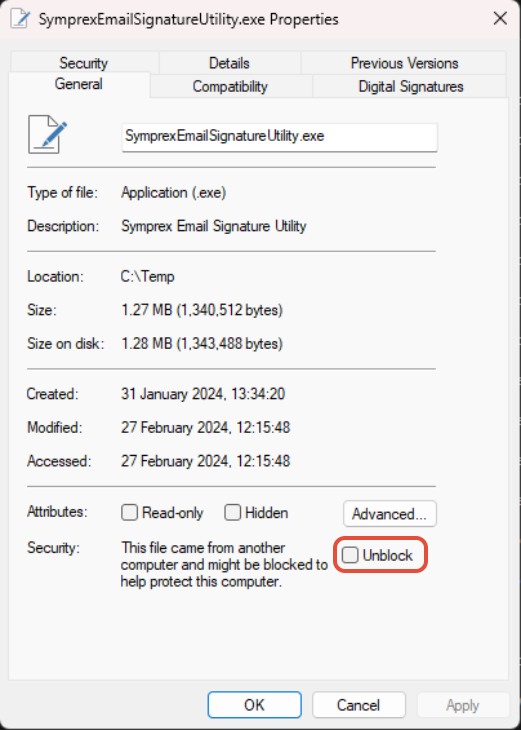
- Right-click the file, open Properties, check the Unblock option, and click Apply:
The following command line arguments can be used to set message fonts:
Set new email font:
/SetNewEmailFont=<Name>,<Size>,<Style>,<Colour>
Set reply/forward font:
/SetReplyForwardFont=<Name>,<Size>,<Style>,<Colour>
Set plain text compose and reading font:
/SetPlainTextComposeReadFont=<Name>,<Size>,<Style>,<Colour>
Where:
<Name>
name of font, for example Calibri or Arial
<Size>
the font size, for example 11
<Style>
either Regular or Italic
<Colour>
font colour in RRGGBB format, for example 000000 for black
Example
Set font to Calibri 11 point black for new and reply/forward email:
SymprexEmailSignatureUtility.exe /SetNewEmailFont=Calibri,11,Regular,000000 /SetReplyForwardFont=Calibri,11,Regular,000000
The following command line arguments are used to control the personal Outlook signatures feature:
Disable Outlook personal signatures
/DisableOutlookSignatures
Enable Outlook personal signatures
/EnableOutlookSignatures
Example
To disable personal Outlook signatures:
SymprexEmailSignatureUtility.exe /DisableOutlookSignatures
The following command line arguments are used to remove existing Outlook signatures:
Remove Outlook stationery
/RemoveStationery
Remove all Outlook signatures
/RemoveAllSignatures
Remove signatures deployed by the Email Signature Manager agent
/RemoveEmailSignatureManagerSignatures
Remove signatures deployed by the Signature 365 classic agent
/RemoveSignature365Signatures
Example
To remove Outlook stationery:
SymprexEmailSignatureUtility.exe /RemoveStationery
Managing Outlook's default signature options with the Signature 365 Outlook add-in
Configure how the Signature 365 Outlook add-in inserts default signatures and handles Outlook's built-in signature settings.
Managing personal signatures, fonts and stationery for "New" Outlook and Outlook on the web
Use Exchange Online PowerShell to manage New Outlook and Outlook on the web fonts, stationery, and user-created signatures with Signature 365.