
Signature 365 agent authentication script error
When attempting to use the Signature 365 agent to retrieve signatures, you see the following error message:
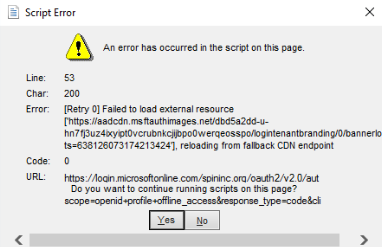
Microsoft has recently made changes to the custom branding function within Microsoft 365, which means this is no longer compatible with the default IE11 browser used by Microsoft's internal authentication components.
Symprex has introduced an option with the agent to use the system browser of the OS to allow authentication.
The following registry setting will need to be configured to use the system browser:
Path: HKEY_CURRENT_USER\SOFTWARE\Symprex\Signature 365 Agent

Type: String
Name: Use System Browser
Value: True
Outlook Desktop - Images appear as attachments when email is saved as draft
Understand the Outlook desktop draft bug that shows embedded signature images as attachments and Microsoft's pending fix.
Signature 365 Classic Agent cannot support Microsoft One Outlook
Learn why the Signature 365 Classic Agent cannot work with Microsoft's new Outlook and how to block the switch.