
Non-delivery report 550 5.4.1 Recipient address rejected: Access denied
If you receive a non-delivery report with an error message similar to the following when you send an email, the message was blocked by Directory-Based Edge Blocking (DBEB) in Microsoft 365.
550 5.4.1 Recipient address rejected: Access denied. AS(201806281) [CWLGBR01FT019.eop-gbr01.prod.protection.outlook.com]
DBEB is enabled by default for your domains in Microsoft 365. DBEB will block external emails sent to email addresses that do not exist within your Entra ID directory.
Microsoft 365 does not currently synchronise mail-enabled public folder mailboxes with Entra ID. When emails have been processed by Signature 365 and are routed back to Microsoft 365, they are considered external by DBEB.
The next steps depend on your environment:
- If your public folders are hosted in Exchange Online
- If your public folders are hosted in Exchange Server on-premise
If your public folders are hosted in Exchange Online
Directory-Based Edge Blocking (DBEB) does not currently support mail-enabled public folders in Exchange Online.
There are two workarounds:
- Stop routing emails sent to public folders via Signature 365 (Recommended)
- Disable Directory-Based Edge Blocking (Not recommended)
Stop routing emails sent to public folders via Signature 365 (Recommended)
Note this workaround means server-side signatures will not be applied to email sent to public folders.
- Log on to Exchange admin center
- Navigate to Mail flow > Rules
- Select the rule Send to Signature 365 for signature injection and click Edit
- In the Except if... section, click add exception
- Select The recipient... and is this person
- In the Select Members dialog, select all mail enabled public folders and click Add
- Click OK, then click Save
Disable Directory-Based Edge Blocking (Not recommended)
- Log on to Exchange admin center
- Navigate to Mail flow > Accepted domains
- Select the domain of the public folder
- Change the domain type to Internal relay
- Click Save
If your public folders are hosted in Exchange Server on-premise
Completing the steps below will ensure that mail-enabled public folders will no longer be considered invalid addresses by DBEB:
- Open Microsoft Entra Connect Sync
- On the Optional Features pane, tick the Exchange Mail Public Folders option:
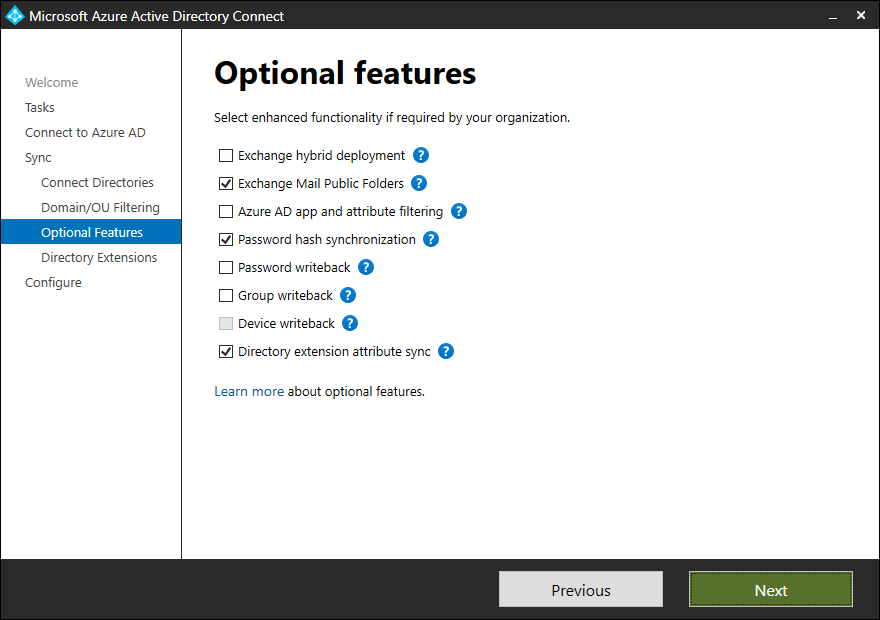
- Complete the wizard
Non-delivery report 550 5.1.8 Access denied, bad outbound sender
Fix 550 5.1.8 bad outbound sender errors when Signature 365 mail flow is misconfigured.
Non-delivery report 550 5.7.1 Unable to relay this email
Fix 550 5.7.1 unable to relay errors caused by Signature 365 connector or certificate configuration.